Length, power type, driver location, dimming, connectors, and mounting surfaces that matter
Upgrading display case lighting to LED offers grocery and butcher store operators improved color accuracy, energy efficiency, and reduced heat output. However, retrofit projects often fail or require expensive rework if the initial measurements and planning are incomplete. Taking precise measurements and documenting case specifics before ordering LED fixtures ensures a smooth installation that protects meat appearance and display consistency.
This guide provides a detailed checklist of what to measure and consider for a successful meat case LED retrofit.
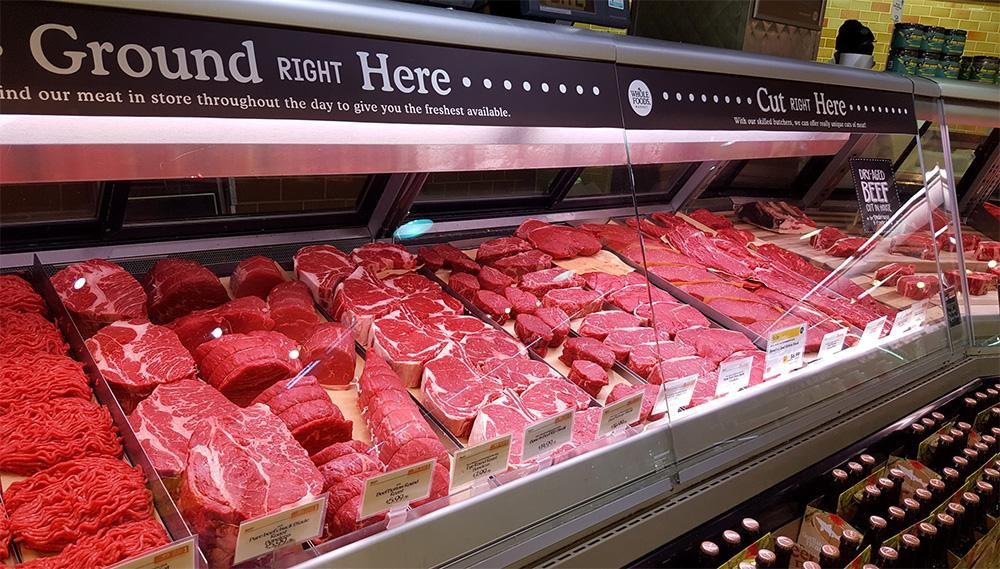
Why Proper Measurements Matter
LED retrofits are not universal. Differences in case width, depth, mounting options, and power requirements mean that one-size-fits-all fixtures rarely fit without modifications. Improperly sized or installed LEDs can lead to:
- Uneven illumination across meat pans
- Glare or shadowing that distorts color perception
- Overheating or electrical issues due to mismatched drivers or connectors
- Increased labor and downtime from last-minute adjustments
- Accurate measurements prevent these issues and protect both product quality and staff efficiency.
Step 1: Measure Case Dimensions
Length of Fixture Needed:
- Measure the inside length of the display case where the LED will be mounted.
- Account for end caps, corner angles, or recessed areas.
- Verify if multiple fixtures are needed for longer cases to ensure consistent lighting across all pans.
Depth and Height Clearance:
- Record the distance from mounting points to the product face.
- Ensure the fixture will not interfere with shelf rails, sliding doors, or service trays.
- Depth determines the beam spread needed for even illumination.
Step 2: Identify Power Requirements
Voltage and Current:
- Determine existing case power supply voltage (e.g., 120V or 277V) to match LED drivers.
- Confirm amperage limits to prevent overloading circuits.
Dimming Needs:
- Some cases benefit from dimming to reduce glare on reflective packaging or maintain proper color perception on different meat cuts.
- Document if current dimmers are compatible with the LED driver.
Driver Location and Access:
- Measure available space for LED drivers.
- Ensure the driver can be mounted in a location that allows ventilation and easy future maintenance.
Step 3: Check Connectors and Mounting Surfaces
Connector Type:
- Identify existing connectors (plugs, pigtails, or hardwire) to match the new fixture.
- Standardizing connectors across cases simplifies installation and future replacements.
Mounting Surfaces:
- Examine brackets, rails, or clips used to hold lights in place.
- Check for obstructions, such as glass panels or refrigeration components, that may affect fixture positioning.
- Verify that the mounting surface can support fixture weight and maintain proper alignment.
Adjustability:
- Determine if the fixture needs adjustable angles for beam focus.
- Some cases require tilting or rotating to avoid shadows on the front row of meat pans.
Step 4: Evaluate Beam Angle and Light Coverage
Uniform Illumination:
- Measure the width of shelves or pans to select LEDs with appropriate beam angles.
- Narrow beams may cause hotspots, while wide beams ensure even lighting across the entire display.
Depth of Light Penetration:
- Consider how far light needs to reach for deep cases.
- Deeper pans may require multiple fixtures or additional reflectors to maintain consistent color and visibility.
Step 5: Record Environmental Conditions
Temperature Exposure:
- Note ambient and refrigerated temperatures to ensure LED drivers can handle operational conditions.
- High heat areas near compressor vents or case walls may require high-temperature rated fixtures.
Moisture and Condensation:
- Measure humidity or condensation patterns inside the case.
- Use IP-rated fixtures or protective covers where moisture accumulation occurs.
Step 6: Document Existing Fixtures for Reference
- Take photographs of current installation, including wiring, connectors, and mounting hardware.
- Record lumens, wattage, and color output of existing lighting.
- Reference helps ensure new LED retrofits match or improve visual performance without introducing glare or color distortion.
Step 7: Prepare a Checklist Before Ordering
Before placing your LED retrofit order, confirm:
- Case length, depth, and height for fixture fit
- Voltage, amperage, and dimming requirements
- Driver location and space for maintenance
- Connector type compatibility
- Mounting surface and weight support
- Beam angle and coverage for uniform illumination
- Temperature and moisture considerations
- Photographs and measurements of existing fixtures
Completing this checklist reduces installation errors, protects meat appearance, and ensures predictable, consistent lighting across all cases.
Conclusion
A successful LED retrofit in meat display cases begins with careful measurement and documentation. Neglecting these details leads to uneven lighting, reduced product appeal, and costly rework. By systematically capturing case dimensions, power requirements, mounting options, and environmental conditions, grocery operators and butcher shops can select the right LED solution the first time.
Proper retrofits improve product color accuracy, enhance shopper confidence, reduce shrink, and increase energy efficiency. Investing time upfront in measurements ensures a smoother installation, long-term reliability, and visually appealing meat displays that help drive sales.
For professional-grade LED solutions and guidance for meat display cases, visit www.meatlighting.com and explore fixtures designed for consistent color, safe temperature operation, and optimal shopper impact.